Friday, April 24, 2009

Transmission BitTorrent on a headless server

I never would have thought installing a WebUI-based torrent client could be so easy. I have a 24/7 running server, on Ubuntu 8.10 Server Edition, so I thought I should try to install a BitTorrent client so I can download torrents even when my PC is turned off, so I can add torrents while away etc. The client of choice was Transmission. I use this on the desktop, too, and the only down side I can find to it is that it doesn't yet support DHT trackerless downloading, which really speeds up your downloads. Anyway, they're working on it (from what I've heard). They never make this obvious anywhere, but to get Transmission up and running really fast, all you have to do is: $ sudo apt-get install transmission-cli $ transmission-daemon After that, just navigate to http://your-server:9091/ and there you have it! The only thing you should still do is install an init.d script so you can run Transmission as another user and automatically on system start-up, which is documented here (and pretty easy). Although the init.d script can't stop Transmission for me (I don't know why, it just hangs), I can always kill it ;)... or wait more than 5 seconds before doing that. Anyway, Transmission is incredibly easy to set up and incredibly efficient, but the Web UI lacks a few features. For example, you can't add a torrent by URL -- you have to download it from the torrent website and upload it to your server, which is a bit annoying. Also, you can't specify a download folder when adding a torrent, all torrents go to the default folder (which you can change, of course). But anyway, all around, it's a good app :).

Thursday, April 16, 2009

Pygmentool

I have written my first Python web application, yay! The purpose of the application is to help people post highlighted code on their blogs using Pygments. I have written an article on this before, but it implied using Pygments from the command line, which is unpleasant for most people. Also, not all people have Python available (like, say, Windows users?) and don't feel like installing it just for this. That's why I have made this nice little application which can do basically two things:
  1. Give you a Pygments-compatible stylesheet, with the style of your choice;
  2. Format your code so you can simply copy-paste it on your blog.
For more, check out the how to page.

Developing the application was a real treat. Werkzeug is awesome through its simplicity (as you may or may not know, I'm not a fan of big frameworks that "do everything for you") and its efficiency. The docs are a bit hard to grasp at first, but after a short while you will know where to find what. What bugged me the most was the tutorial which I found a bit backwards and I thought it emphasized way too much on the database part of the project (which has no relation whatsoever to Werkzeug). Also, it jumps from one thing to another, which makes it pretty hard to follow and, honestly, I wasn't able to read it through to the end (although I'm sure I will read it at some point, it looks like a great resource that teaches good coding habits, code organizing and SQLAlchemy usage!). I just picked up bits from other pages in the documentation. But, unlike the tutorial, Werkzeug is awesome. I like the fact that it works directly on the WSGI layer, so you can really understand how everything works. Also, it doesn't have hundreds of modules that do all sorts of things and in which you will get so lost. Basically, it gives you full control over everything.

Jinja2 is also pretty cool. It's actually the first template engine I use, but it's so straightforward, feature packed and terribly easy to use that it must be one of the best!

Pygments, well, what can I say. This project would have been pretty much impossible without it.

I have decided to make the source code of the application available. I've done this for a couple of reasons. For one, it may be a good starting point for those trying to learn Python + Werkzeug. The second reason is for people with more experience to be able to criticize my coding and maybe give some advice ;). [pygmentool.tar.gz]

The fun thing is, all three big modules I used in this (Werkzeug, Jinja2 and Pygments) are developed by the Pocoo team. They're pretty pythastic :D.

I still have a lot to learn. I have no idea how SQLAlchemy (which seems to be what people use these days in web apps and not only) works. Also, I have no idea how to use sessions in a Python web application (and they're critical in bigger projects), but I have a hunch I would have to use flup, so I'll have to study that, too. But this was a nice appetizer :).

Sunday, April 12, 2009

The nature of the HTTP protocol

When first learning web programming and web design, a very basic thing it is good to understand from the very beginning is the nature of the HTTP protocol. That's because everything you are going to do will be based on this protocol. HTTP is a "connect-and-disconnect" type of protocol. Here's a hopeful diagram (which I will explain shortly): I will try my best to explain this simple yet very important diagram. Let's say you have this PHP file named hello.php, in the root of your web server: <?php echo "Hello, World!"; ?> Here's what happens when you enter http://localhost/hello.php in your browser (which I will call the client from now on):
  1. The client connects to the web server and tells it it wants the hello.php file;
  2. The server realizes the file is a PHP file, so it runs it through the PHP parser;
  3. The PHP parser parses the hello.php file and returns the output to the web server;
  4. The web server takes the output from the PHP parser which, in our case, will be the simple string Hello, World! and passes it back to the client.
This is essential in web development because you have to have the difference between client side and server side languages as clear as possible in your mind. If you don't, you will find yourself making basic mistakes such as trying to call a PHP function from Javascript, for example: <script type="text/javascript"> function someFunc(someArg) { alert("<?php echo somePhpFunc($someArg); ?>"); } </script> The above code will fail horribly because all the PHP code is executed before the script is sent to the client. Basically, the somePhpFunc function will be called only once, with an empty argument and will probably return an empty string (because it doesn't expect an empty argument). Thus, the script will reach the client in this form: <script type="text/javascript"> function someFunc(someArg) { alert(""); } </script> which is definitely not what you want. Tip: When in doubt, always look at the source code of the web page through your browser (usually View -> Page Source) to see what is actually being sent to the client. Note: I have used PHP for my examples because it's the easiest language to give examples in and almost everyone knows a little bit of it. If not, you can easily figure out what echo "Hello, World!"; does. What I have said here applies to all server side languages, such as Python, Perl, Java, Coldfusion, ASP (bleh), byte code etc. I hope I helped somebody :-)

Friday, April 10, 2009

A possible new look

I made a Blogger theme concept. I'm not sure it can actually be implemented in Blogger, but I'll try (I have to read the documentation on Blogger templates). So far I have just an image: Here's the Inkscape SVG concept. Hope I'll get the time to look into Blogger template docs and make this happen in the near future.

Sunday, April 5, 2009

Smart Ajax / Javascript Paths

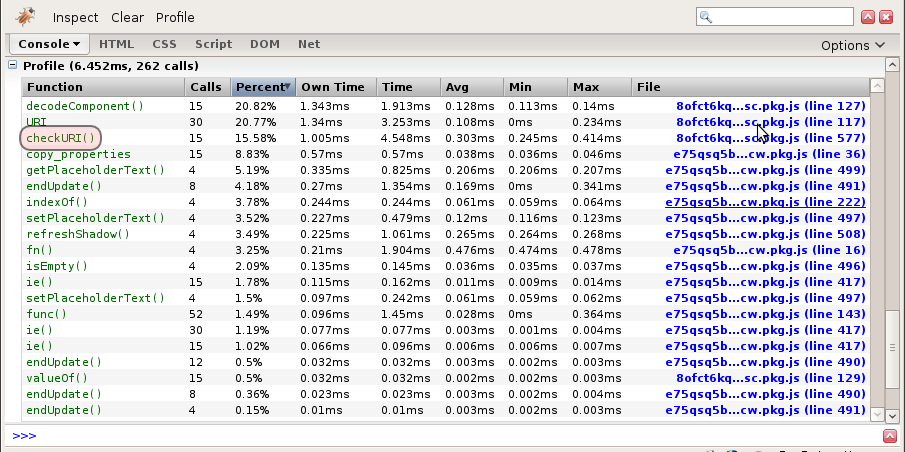
I always wondered how heavy Ajax applications (like Facebook) make use of those smart paths. When I browse on Facebook, I can see that the actual URL is always the same, usually http://facebook.com/home.php, but after that comes a "#" and then a path, for example http://facebook.com/home.php#/profile.php etc. I had a look with Firebug and found that there are no magic Javascript events going on or anything, they just check document.location at a given interval (also found some funny business). The reason why this hash-url is genius is because it doesn't break the back button, although the pages load using Ajax. Knowing these, I was able to make a small function that will call another function whenever the URL has changed. Here it is: function PathWatch(path_change_cb, interval) { // Store initial path this.path = document.location.href; // Store the function to call when the path changes this.path_change_cb = path_change_cb; // Default interval is 400 miliseconds if (!interval) interval = 400; this.check_new_path = function() { // If the location has changed, store the new location // and call the callback function if (document.location.href != this.path) { this.path = document.location.href; this.path_change_cb(); } } // Check for a new path every interval miliseconds this.oInterval = setInterval(this.check_new_path, interval); } Here's a simple example use: function path_changed() { console.log(document.location.href); } PathWatch(path_changed); This obviously only works if you have Firebug installed and doesn't do any Ajax-y stuff, but it proves how useful this can be. Nice :-) In response to JD :: UX Developer's comment below: You mean how I would implement it in a real website? Well, for starters we know that, when coding an Ajax-enhanced website, it must still be able to work entirely without Javascript (for accessibility reasons). Basically, I'd do something like this: 1) On every Ajax-enabled link <a href="path/to/non-ajax/page.html" onclick="window.location.href='#/smart/ajax/path'> 2) In my script, I'd make a function that catches the URL changes using the above PathWatch object (like path_changed in our example is) in which I would parse document.location.hash which contains everything that's after "#" in the nav bar and does requests and page changes accordingly. For example, if the path changed to #/profile/1123, I'd make a request for profile details for profile #1123 and show information about it. Basically, I don't care if the path change was made by a user clicking a link or clicking the back button. I hope I was clear, let me know if I was not (I'm a bit tired and in a hurry) and I will answer any question you might still have :-).

Facebook funnies

An excerpt from a Facebook Javascript file: function URI(uri) { if (uri===window) { Util.error('what the hell are you doing'); return; } // ... Hah! I found this while trying to figure out how they do the smart Ajax urls (like http://example.com/page.html#/smart/path) and it seems they just check from time to time (about five times a second) if the document location has changed: Firebug FTW!

Saturday, April 4, 2009

Keywords from a string

For a project of mine, I had to get the most used X words from a string (mainly an HTML document), in Python. I took some inspiration from this post, but added quite a few things to it (besides translating it to Python, duh). Here are a few optimizations I made:
  • Parse only the content between <body> and </body>;
  • Remove any scripts or stylesheets as they will contain words that repeat a lot of times (variable names, CSS attributes etc.) which we don't need;
  • Besides removing tags, I'm also removing HTML entities (things like &smth;).
Ok, here's what I've got (again, I tried my best to comment what everything does): def get_text_keywords(page_content, n_words=20, html=True, stopwords=stopwords): # If the input is a html document, strip html tags and entities and parse # only the <body> of the document if html: page_content = re.sub(re.compile('<script.+?</script>', re.DOTALL), '', page_content) page_content = re.sub(re.compile('<style.+?</style>', re.DOTALL), '', page_content) page_content = page_content[page_content.find('<body'):page_content.find('</body>')] page_content = re.sub(re.compile('<.*?>', re.DOTALL), '', page_content) page_content = re.sub(re.compile('&.*?;', re.DOTALL), '', page_content) # Get the words in a list and remove stopwords l_swords = re.split('[^\w\']+', page_content, ) l_words = [ ] for word in l_swords: word = word.lower() if word not in stopwords and len(word) > 1: l_words.append(word) # Get the words in a dict ( dict['word'] = number_of_occurences ) d_words = { } for word in l_words: if word in d_words: d_words[word] += 1 else: d_words[word] = 1 # Put the words in a list, ordered by the word count (cryptic Python FTW) l_words = [ k for k, v in sorted(d_words.iteritems(), key = lambda (k,v): (v,k), reverse=True) ] # Return the first n_words in the list return l_words[:n_words] Basically, the function returns the most used n_words words from a string. I took the stopwords from here, as I found the CSV to be easier to parse. I made it into a python module that contains a stopwords list so it can be easily imported and used (e.g. from stopwords import stopwords). Here it is: stopwords = [ "a's", "able", "about", "above", "according", "accordingly", "across", "actually", "after", "afterwards", "again", "against", "ain't", "all", "allow", "allows", "almost", "alone", "along", "already", "also", "although", "always", "am", "among", "amongst", "an", "and", "another", "any", "anybody", "anyhow", "anyone", "anything", "anyway", "anyways", "anywhere", "apart", "appear", "appreciate", "appropriate", "are", "aren't", "around", "as", "aside", "ask", "asking", "associated", "at", "available", "away", "awfully", "be", "became", "because", "become", "becomes", "becoming", "been", "before", "beforehand", "behind", "being", "believe", "below", "beside", "besides", "best", "better", "between", "beyond", "both", "brief", "but", "by", "c'mon", "c's", "came", "can", "can't", "cannot", "cant", "cause", "causes", "certain", "certainly", "changes", "clearly", "co", "com", "come", "comes", "concerning", "consequently", "consider", "considering", "contain", "containing", "contains", "corresponding", "could", "couldn't", "course", "currently", "definitely", "described", "despite", "did", "didn't", "different", "do", "does", "doesn't", "doing", "don't", "done", "down", "downwards", "during", "each", "edu", "eg", "eight", "either", "else", "elsewhere", "enough", "entirely", "especially", "et", "etc", "even", "ever", "every", "everybody", "everyone", "everything", "everywhere", "ex", "exactly", "example", "except", "far", "few", "fifth", "first", "five", "followed", "following", "follows", "for", "former", "formerly", "forth", "four", "from", "further", "furthermore", "get", "gets", "getting", "given", "gives", "go", "goes", "going", "gone", "got", "gotten", "greetings", "had", "hadn't", "happens", "hardly", "has", "hasn't", "have", "haven't", "having", "he", "he's", "hello", "help", "hence", "her", "here", "here's", "hereafter", "hereby", "herein", "hereupon", "hers", "herself", "hi", "him", "himself", "his", "hither", "hopefully", "how", "howbeit", "however", "i'd", "i'll", "i'm", "i've", "ie", "if", "ignored", "immediate", "in", "inasmuch", "inc", "indeed", "indicate", "indicated", "indicates", "inner", "insofar", "instead", "into", "inward", "is", "isn't", "it", "it'd", "it'll", "it's", "its", "itself", "just", "keep", "keeps", "kept", "know", "knows", "known", "last", "lately", "later", "latter", "latterly", "least", "less", "lest", "let", "let's", "like", "liked", "likely", "little", "look", "looking", "looks", "ltd", "mainly", "many", "may", "maybe", "me", "mean", "meanwhile", "merely", "might", "more", "moreover", "most", "mostly", "much", "must", "my", "myself", "name", "namely", "nd", "near", "nearly", "necessary", "need", "needs", "neither", "never", "nevertheless", "new", "next", "nine", "no", "nobody", "non", "none", "noone", "nor", "normally", "not", "nothing", "novel", "now", "nowhere", "obviously", "of", "off", "often", "oh", "ok", "okay", "old", "on", "once", "one", "ones", "only", "onto", "or", "other", "others", "otherwise", "ought", "our", "ours", "ourselves", "out", "outside", "over", "overall", "own", "particular", "particularly", "per", "perhaps", "placed", "please", "plus", "possible", "presumably", "probably", "provides", "que", "quite", "qv", "rather", "rd", "re", "really", "reasonably", "regarding", "regardless", "regards", "relatively", "respectively", "right", "said", "same", "saw", "say", "saying", "says", "second", "secondly", "see", "seeing", "seem", "seemed", "seeming", "seems", "seen", "self", "selves", "sensible", "sent", "serious", "seriously", "seven", "several", "shall", "she", "should", "shouldn't", "since", "six", "so", "some", "somebody", "somehow", "someone", "something", "sometime", "sometimes", "somewhat", "somewhere", "soon", "sorry", "specified", "specify", "specifying", "still", "sub", "such", "sup", "sure", "t's", "take", "taken", "tell", "tends", "th", "than", "thank", "thanks", "thanx", "that", "that's", "thats", "the", "their", "theirs", "them", "themselves", "then", "thence", "there", "there's", "thereafter", "thereby", "therefore", "therein", "theres", "thereupon", "these", "they", "they'd", "they'll", "they're", "they've", "think", "third", "this", "thorough", "thoroughly", "those", "though", "three", "through", "throughout", "thru", "thus", "to", "together", "too", "took", "toward", "towards", "tried", "tries", "truly", "try", "trying", "twice", "two", "un", "under", "unfortunately", "unless", "unlikely", "until", "unto", "up", "upon", "us", "use", "used", "useful", "uses", "using", "usually", "value", "various", "very", "via", "viz", "vs", "want", "wants", "was", "wasn't", "way", "we", "we'd", "we'll", "we're", "we've", "welcome", "well", "went", "were", "weren't", "what", "what's", "whatever", "when", "whence", "whenever", "where", "where's", "whereafter", "whereas", "whereby", "wherein", "whereupon", "wherever", "whether", "which", "while", "whither", "who", "who's", "whoever", "whole", "whom", "whose", "why", "will", "willing", "wish", "with", "within", "without", "won't", "wonder", "would", "would", "wouldn't", "yes", "yet", "you", "you'd", "you'll", "you're", "you've", "your", "yours", "yourself", "yourselves", "zero" ] Here's what it says for this blog's homepage: ['code', 'script', 'php', 'file', 'framework', 'directory', 'main', 'found', 'syntax', 'python', 'pygments', 'oracle', 'blogger', 'apache', 'znupi', 'posted', 'post', 'modules', 'load', 'comments'] Pretty useful :-)